Explore the Mooncake architecture: how pg_mooncake, moonlink, duckdb_mooncake, and pg_duckdb 1.2.0 work together, and how v0.2 / v0.3 evolved from v0.1.
This is the multi-page printable view of this section. .
Mooncake Documentation
Unified documentation hub for the PostgreSQL real-time columnstore and Apache Iceberg v2 lakehouse suite: pg_mooncake (v0.3.0), moonlink (v0.0.1), and duckdb_mooncake (v0.0.2).
- 1: Welcome to pg_mooncake
-
2: Get Started & Installation
- 2.1: Hello World Tutorial
- 2.2: Known Limitations
- 3: SQL Procedures, Views & Configuration Reference
- 4: Use Cases & Architecture Patterns
-
5: v0.1 Archive: Welcome to pg_mooncake (Delta Lake)
- 5.1: v0.1 Architecture (Delta Lake & USING columnstore)
- 5.2: v0.1 Get Started
- 5.3: v0.1 Hello World (USING columnstore)
- 5.4: v0.1 Cloud Storage (mooncake.create_secret)
- 5.5: v0.1 on Neon Postgres
- 5.6: v0.1 Reference Overview
- 5.7: v0.1 Columnstore DDL (USING columnstore)
- 5.8: v0.1 Querying Columnstore Outside Postgres
- 5.9: v0.1 GUC Configurations
- 5.10: v0.1 Load Data
- 5.11: v0.1 Query External Files
- 5.12: v0.1 Supported Queries & Query Shapes
- 5.13: v0.1 Data Archiving
- 5.14: v0.1 Operational Analytics (Trigger + pg_cron Staging)
- 5.15: v0.1 Data Warehousing & dbt
-
6: About
- 6.1: Roadmap
- 6.2: License
- 6.3: Attribution
- 6.4: Trademark Policy
- 6.5: SBOM & Security Audit
Core Documentation
Getting StartedPG 14–18
Install pg_mooncake and pg_duckdb via Pigsty packages or build from source, run the Hello World columnstore mirror tutorial, and review known limitations.
Complete reference for mooncake.create_table, create_snapshot, optimize_table, list_tables, query shapes, Iceberg S3/R2 configuration, and external data lake scans.
Architectural patterns for real-time operational analytics (HTAP), time-partitioned table archiving, the zero-ETL Postgres lakehouse, and OpenTelemetry log analytics.
v0.1 Archive (Delta Lake)Deprecated
Complete historical reference archive for pg_mooncake v0.1 (USING columnstore + Delta Lake storage), preserved for legacy deployments and Wayback URL compatibility.
PGSTY community stewardship, MIT and BSL-1.1 linking exception licensing, Wayback Machine recovery provenance, and Cargo security dependency audit reports.
Component Deep Dives
Write path (Logical WAL -> Moonlink), read path (pg_duckdb -> duckdb_mooncake), and dual-format storage (in-memory Arrow + Parquet + Apache Iceberg v2).
Real-time CDC streaming, Arrow write buffers, Roaring Bitmap deletion vectors, LSN snapshot barriers, and standalone moonlink_service REST/RPC deployment.
How duckdb_mooncake v0.0.2 connects DuckDB 2.0 and pg_duckdb 1.2.0 to Moonlink metadata and performs multi-file Parquet statistics pruning.
Replicate local or remote (src_uri) PostgreSQL heap and partitioned tables into USING mooncake columnstore mirrors with CALL mooncake.create_table(...).
Configure mooncake.default_bucket for AWS S3 or Cloudflare R2, materialize snapshots with mooncake.create_snapshot, and query from external engines.
Query external Parquet, CSV, JSON, Apache Iceberg, Delta Lake, and HuggingFace datasets directly inside PostgreSQL and join them with heap tables.
1 - Welcome to pg_mooncake
Overview of pg_mooncake (v0.3.0), real-time columnstore mirror tables, Moonlink CDC ingestion, and DuckDB 2.0 vectorized execution in PostgreSQL.
pg_mooncake is a PostgreSQL extension that adds real-time columnstore mirror tables (USING mooncake), DuckDB 2.0 vectorized analytical execution (via pg_duckdb and duckdb_mooncake), and open Apache Iceberg v2 storage (powered by moonlink) directly inside PostgreSQL.
PostgreSQL with pg_mooncake ranks among the fastest analytical databases on ClickBench while keeping your existing PostgreSQL transactional write path untouched. Originally created by Mooncake Labs, the extension suite (pg_mooncake v0.3.0, duckdb_mooncake v0.0.2, and moonlink v0.0.1) is now maintained by the PGSTY community for PostgreSQL 14–18.
PGSTY Maintained Suite (
v0.3.0)pgsty/pg_mooncake(v0.3.0,MIT): PostgreSQL extension providing theUSING mooncaketable access method,mooncake.*SQL procedures, and the embedded Moonlink background worker (pgrx 0.19.3).pgsty/moonlink(v0.0.1,BSL-1.1withpg_mooncakeLinking Exception): Real-time Rust storage engine that ingests PostgreSQL logical replication streams into in-memory Arrow buffers, Roaring Bitmap deletion vectors, and Apache Iceberg v2 / Parquet files.pgsty/duckdb_mooncake(v0.0.2,MIT): DuckDB 2.0 storage extension bundled withpg_mooncakethat scans Moonlink tables with multi-file Parquet statistics pruning.
The Problem
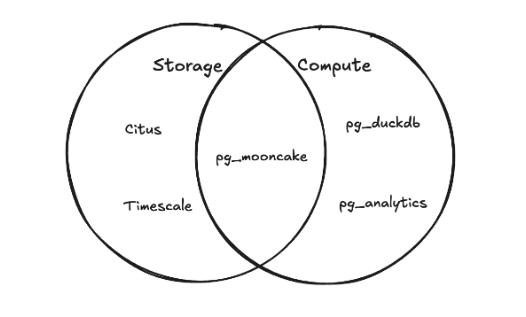
PostgreSQL is an exceptional transactional (OLTP) database, but its row-oriented heap storage and tuple-at-a-time executor are not designed for large-scale analytical scans (OLAP). Historically, PostgreSQL teams faced two flawed choices:
- Adopt a separate analytical system (ClickHouse, Snowflake, BigQuery) Requires maintaining fragile CDC pipelines (Debezium + Kafka), duplicating data models, dealing with eventual consistency lag, and losing the ability to join live operational tables with analytical history in a single query.
- Use in-database columnstores without vectorized execution or real-time CDC
Traditional columnar extensions either lack a modern vectorized execution engine or cannot handle high-frequency transactional
INSERT,UPDATE, andDELETEoperations without generating thousands of tiny Parquet files.
How pg_mooncake Solves It
Starting in v0.2 and refined in PGSTY’s v0.3.0 release, pg_mooncake introduces a columnstore mirror architecture:
- Write to Rowstore, Read from Columnstore: Your application continues writing (
INSERT,UPDATE,DELETE) to the standard PostgreSQLtradesheap table with full ACID guarantees and indexes. - Sub-Second Logical Replication via Moonlink: Behind the scenes,
pg_mooncake’s background worker streams WAL changes intomoonlink, buffering recent mutations in memory as Apache Arrow batches and tracking updates/deletes via Roaring Bitmap deletion vectors before compacting into Parquet files. - Vectorized DuckDB 2.0 Queries: Analytical queries against
trades_analyticsare routed throughpg_duckdb 1.2.0andduckdb_mooncake v0.0.2, merging in-memory Arrow buffers and on-disk Parquet segments with segment elimination and LSN consistency barriers. - Open Apache Iceberg v2 Lakehouse: With
CALL mooncake.create_snapshot('trades_analytics'), Moonlink emits standard Apache Iceberg v2 metadata on local disk, AWS S3, or Cloudflare R2—ready for Spark, Snowflake, DuckDB, or PyIceberg without any ETL pipeline.
Explore This Section
Understand how pg_mooncake, pg_duckdb, duckdb_mooncake, and moonlink coordinate writes, reads, and Iceberg snapshots.
Deep dive into Moonlink (v0.0.1), in-memory Arrow write buffers, deletion vectors, and standalone HTTP/RPC server deployment.
Learn how duckdb_mooncake v0.0.2 integrates with DuckDB 2.0 and pg_duckdb 1.2.0 for vectorized scans and Parquet statistics pruning.
Compare the legacy v0.1 Delta Lake (USING columnstore) architecture with v0.2 Moonlink mirrors and PGSTY’s v0.3.0 enhancements.
1.1 - Architecture
How pg_mooncake (v0.3.0), pg_duckdb (1.2.0), duckdb_mooncake (v0.0.2), and moonlink (v0.0.1) work together to deliver real-time columnar analytics in PostgreSQL.
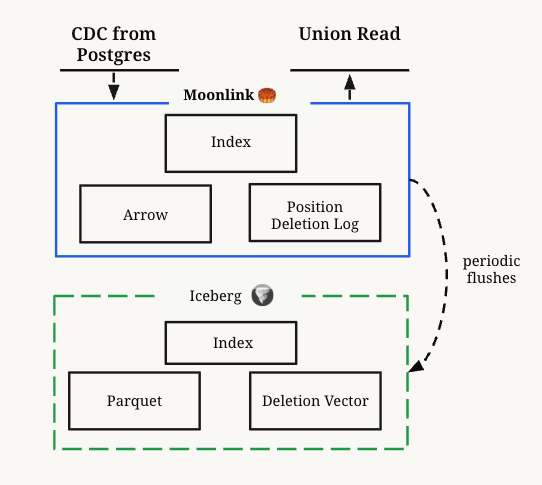
pg_mooncake (v0.3.0) combines three specialized components inside a single PostgreSQL deployment:
pg_duckdb(v1.2.0): Embeds the DuckDBv2.0.0vectorized analytical execution engine inside PostgreSQL and routes queries against non-heap table access methods.moonlink(v0.0.1): A Rust library and background worker embedded insidepg_mooncakethat ingests PostgreSQL logical replication streams, maintains an in-memory Apache Arrow write buffer and Roaring Bitmap deletion vectors, flushes Parquet files, and emits Apache Iceberg v2 table metadata.duckdb_mooncake(v0.0.2): A DuckDB 2.0 C++/Rust storage extension loaded automatically bypg_mooncakefrom a local extension repository (mooncake.extension_repository). It connects to Moonlink over a local Unix domain socket RPC (pg_mooncake/moonlink.sock) to read consistent snapshots across both flushed Parquet files and buffered Arrow batches.
Together, they expose a native PostgreSQL Table Access Method (USING mooncake) managed through CALL mooncake.create_table(dst, src).
Component Pinning in pg_mooncake 0.3.0
| Component | Version / Tag | Pinned Commit (versions.json) |
Role |
|---|---|---|---|
pg_mooncake |
v0.3.0 |
1a9cbfd65be9a6486d020120acb49ef0c6800d68 |
PostgreSQL extension (pgrx 0.19.3), SQL procedures, USING mooncake TAM, and background worker launcher |
moonlink |
v0.0.1 |
b298ef7444890e3c8af5544e350232518bcfd8e5 |
Embedded Rust CDC ingestion engine, Arrow buffer, deletion vectors, and Iceberg v2 snapshot writer |
duckdb_mooncake |
v0.0.2 |
49765a369ad88986916ce53c969ed2ce4ba66fac |
DuckDB 2.0 extension (mooncake.duckdb_extension) scanning Moonlink tables and Parquet statistics |
pg_duckdb |
v1.2.0 |
8756099e267c47f0b86c24de4cf995327f1f4279 |
Embedded DuckDB execution bridge inside PostgreSQL (enforced by SQL installation guard) |
duckdb |
v2.0.0 |
d54cbbe3df17e8e5ce68312f483b4155836112aa |
Underlying C++ vectorized analytical query engine |
Write Path
In pg_mooncake, you never write directly to the USING mooncake columnstore table. Instead, you write to your regular PostgreSQL rowstore (heap or partitioned) table:
- Initial Table Copy & Slot Creation: When you execute
CALL mooncake.create_table('dst', 'src'),pg_mooncake:- Inspects the source table’s schema and creates the destination table with
USING mooncake. - Sets
REPLICA IDENTITY FULLon the source table (and, inv0.3.0, automatically on all existing leaf partitions if the source is a partitioned table) if the source table does not have a primary key. - Creates a PostgreSQL publication and logical replication slot (
pgoutput), copies existing rows fromsrcinto Moonlink, and records the starting WAL LSN.
- Inspects the source table’s schema and creates the destination table with
- Continuous Logical Replication: A background worker (
mooncake_bgworker) continuously consumes WAL changes (INSERT,UPDATE,DELETE) from the logical replication slot and streams them tomoonlink. - Buffered Arrow + Deletion Vectors:
- Inserts are appended to an in-memory Apache Arrow write buffer (
write_buffer_size, default32 MB), making new rows immediately visible to analytical queries without writing a tiny Parquet file per transaction. - Deletes record the target row’s location in an in-memory/on-disk Roaring Bitmap deletion vector, avoiding expensive full-file Parquet rewrites on every
DELETE. - Updates are processed atomically as a deletion vector entry for the old tuple plus an append to the Arrow buffer for the new tuple.
- Inserts are appended to an in-memory Apache Arrow write buffer (
- Background Compaction & Parquet Flush: Once the write buffer reaches its threshold or when
CALL mooncake.create_snapshot('dst')/CALL mooncake.optimize_table('dst', 'full')is invoked, Moonlink flushes the buffered Arrow records into compressed Parquet files and updates the Apache Iceberg v2 metadata.
Read Path
When you run a SELECT query that references a USING mooncake columnstore table:
- Query Routing via
pg_duckdb: PostgreSQL’s planner recognizes themooncaketable access method (registered withpg_duckdbviaRegisterDuckdbTableAm("mooncake")) and hands the query plan over to the embedded DuckDB 2.0 engine. - Automatic Extension Attachment: On the first scan in a backend session,
pg_mooncakeconfiguresSET extension_directory = '<mooncake.extension_repository>', loads themooncakeDuckDB extension (duckdb_mooncake v0.0.2), and executesATTACH '' AS mooncake (TYPE mooncake, METADATA '<pgdata>/pg_mooncake'). - LSN Synchronization Barrier: Before scanning a table,
duckdb_mooncakequeries PostgreSQL’s current WAL write/insert LSN and instructs Moonlink via RPC (scan_table_begin) to wait until the replication stream has ingested up to that LSN—guaranteeing read-your-own-writes transactional consistency. - Hybrid Arrow + Parquet Scan with Segment Elimination:
- Moonlink returns the list of active Parquet data files, active deletion vectors, and a pointer to the current in-memory Arrow buffer.
duckdb_mooncakereads Parquet column min/max statistics through DuckDB 2.0’s exported multi-file reader interface to skip irrelevant files and row groups (segment elimination), applies deletion vectors, and streams the combined results back to PostgreSQL.
Storage Layout
By default (mooncake.default_bucket = ''), Moonlink stores table metadata, deletion vectors, and Parquet data files under your PostgreSQL data directory at $PGDATA/pg_mooncake/.
When mooncake.default_bucket is set to an s3:// or r2:// URI (with credentials configured in duckdb.secrets), Moonlink writes Parquet data files and Apache Iceberg v2 metadata (metadata/*.metadata.json and Avro manifest lists) directly to object storage. You can inspect the active warehouse path and LSN progress for every mirrored table at any time with:
1.2 - Moonlink Ingestion Engine
Deep dive into Moonlink (v0.0.1): real-time CDC ingestion, Arrow buffers, Roaring deletion vectors, LSN snapshot barriers, and standalone HTTP/RPC deployment.
Moonlink (pgsty/moonlink, current release v0.0.1) is a Rust library and standalone service designed to write and maintain real-time Apache Iceberg v2 and Delta Lake tables for operational systems and event streams without Apache Spark or Kafka.
Inside pg_mooncake, Moonlink runs as an embedded PostgreSQL background worker (mooncake_bgworker) communicating over a local Unix domain socket ($PGDATA/pg_mooncake/moonlink.sock). It can also be compiled and deployed as a standalone HTTP REST and gRPC ingestion server (moonlink_service).
Licensing (
BSL-1.1 with pg_mooncake Linking Exception)The core moonlink server engine is licensed under BSL-1.1 (converting automatically to Apache-2.0 on 2029-05-05) with an explicit PG_MOONCAKE LINKING & DISTRIBUTION EXCEPTION granting unrestricted linking, modification, and redistribution when embedded in or distributed as part of pg_mooncake. Its protocol and client crates (moonlink_rpc, moonlink_proto, moonlink_error, moonlink_table_metadata) are licensed under MIT. See Licensing for full text.
Core Design Principles
Traditional data lake writers face a fundamental trade-off between data freshness and query performance: flushing every row mutation immediately creates thousands of tiny Parquet files, whereas batching writes for 5–15 minutes introduces unacceptable latency for operational analytics.
Moonlink resolves this trade-off with a multi-tiered storage architecture:
- In-Memory Apache Arrow Write Buffer: Incoming
INSERTandUPDATErows are appended to an active in-memory ArrowRecordBatchbuffer (write_buffer_size, default32 MB). Readers (duckdb_mooncake) can scan this buffer directly with zero-copy Arrow integration before it is ever flushed to Parquet. - Equality & Position Deletion Vectors (Roaring Bitmaps): Instead of rewriting Parquet files on every
UPDATEorDELETE, Moonlink indexes primary/replica keys via a B-tree index (moonlink_btree) and marks deleted row offsets in compressed Roaring Bitmaps. - LSN-Tracked Commits & Non-Blocking Snapshots: Every mutation ingested from PostgreSQL WAL is tagged with its commit
lsn. Readers pass their target LSN toscan_table_begin, waiting only if the replication stream has not yet reached that LSN. - Asynchronous Compaction & Iceberg v2 Metadata: Background compaction merges flushed Parquet segments, reconciles deletion vectors, and writes standard Apache Iceberg v2
metadata.jsonand Avro manifest files to local disk or S3/R2 object storage.
What’s Fixed in moonlink v0.0.1
In PGSTY’s moonlink v0.0.1 (b298ef7444890e3c8af5544e350232518bcfd8e5) release:
- Non-blocking
create_snapshot(lsn)under unrelated WAL progress: Previously, callingCALL mooncake.create_snapshot('table')when the PostgreSQL database WAL had advanced due to writes on unrelated tables caused Moonlink’s snapshot waiter to hang indefinitely waiting for a table-level commit at the latest database LSN. Inv0.0.1, replication progress notifications advance the table’s safe LSN watermark and flush older committed data immediately, even when no new commits arrive for that specific table. - 58/58 Table Handler Unit Tests: Verified across append, update, delete, rollback, compaction, and snapshot barrier scenarios on Rocky Linux 10 (
aarch64) and Ubuntu 24.04 (aarch64). - Security Dependency Audit Updates: Patched
bytes,crossbeam-epoch,h2,lz4_flex,quinn-proto,rustls,rustls-webpki,webpki-roots,time,zstd,anyhow,event-listener,lru(0.18.5),memmap2,rand,tokio(1.51.6),aws-lc-rs, andserial_test.
Standalone Deployment (moonlink_service)
While pg_mooncake embeds Moonlink automatically, you can also run moonlink_service as a standalone ingestion server for direct HTTP REST or gRPC streaming into Iceberg tables.
Building moonlink_service from Source
Standalone REST API Workflow
The standalone service listens on port 3030 by default and exposes JSON endpoints for table creation, row ingestion, and Iceberg snapshot generation:
Querying the Iceberg Snapshot from DuckDB
Once a snapshot is created, any Iceberg-compatible engine (DuckDB, Spark, Trino, Snowflake, PyIceberg) can read the table directly:
1.3 - duckdb_mooncake & DuckDB 2.0 Integration
How duckdb_mooncake (v0.0.2) connects DuckDB 2.0 and pg_duckdb 1.2.0 to Moonlink tables, performs multi-file Parquet statistics pruning, and installs via a local extension repository.
duckdb_mooncake (pgsty/duckdb_mooncake, current release v0.0.2, MIT license) is a C++ and Rust FFI storage extension for DuckDB v2.0.0. It allows DuckDB (both standalone and embedded inside PostgreSQL via pg_duckdb 1.2.0) to attach directly to a moonlink metadata directory and execute vectorized scans over Moonlink tables.
Role Inside pg_mooncake 0.3.0
When pg_mooncake executes a query against a USING mooncake table inside PostgreSQL, pg_duckdb delegates the table scan to DuckDB. pg_mooncake automatically initializes the DuckDB session by running:
Local Extension Repository (mooncake.extension_repository)
Rather than downloading an unsigned binary from a remote community S3 bucket at runtime, pg_mooncake 0.3.0 builds and packages mooncake.duckdb_extension (v0.0.2) directly alongside the PostgreSQL extension into a local DuckDB extension repository:
The PostgreSQL GUC mooncake.extension_repository points to this directory (or can be overridden in postgresql.conf when installing to a custom path), ensuring offline, deterministic, byte-for-byte reproducible loading with duckdb.allow_unsigned_extensions = true.
DuckDB 2.0 Adaptation in v0.0.2
In PGSTY’s duckdb_mooncake v0.0.2 (49765a369ad88986916ce53c969ed2ce4ba66fac) release, the extension was ported to DuckDB v2.0.0 (d54cbbe3df17e8e5ce68312f483b4155836112aa) and pg_duckdb 1.2.0:
- DuckDB 2.0 Storage & Catalog APIs: Updated storage extension registration, catalog entry lookup, Arrow schema conversion (
nanoarrow 0.7), table function binding, multi-file lists, and table filter pushdown to match DuckDB 2.0 signatures. - Exported Multi-File Parquet Statistics Interface: Earlier builds depended on internal
ParquetReadersymbols that are no longer exported bylibduckdb.soin DuckDB 2.0.duckdb_mooncake v0.0.2reads column statistics through DuckDB 2.0’s exported multi-file reader interface (MultiFileReader), verifying zero unresolved dynamic symbols (ldd -r) againstpg_duckdb’slibduckdb.so. - Object-Cache Deadlock Elimination: Previously, constructing cached statistics entries inside the object-cache mutex could trigger a reentrant lock deadlock when loading Parquet file metadata also accessed the DuckDB object cache.
v0.0.2constructs statistics entries outside the object-cache mutex before inserting them into the cache. - CRoaring & Corrosion Build Hardening: Links against
Corrosion v0.5,nanoarrow 0.7, andCRoaring v5.5.4(with SHA-256 verification when a systemlibroaringis absent), and builds the Rustmoonlink_fficlient with--lockedCargo dependencies (0RustSec vulnerability matches).
Standalone Usage in DuckDB CLI
You can also load duckdb_mooncake directly in a standalone DuckDB v2.0.0 CLI (duckdb -unsigned) to inspect or query a Moonlink directory:
1.4 - v0.1 vs v0.2 & v0.3 Evolution
Architectural comparison between pg_mooncake v0.1 (USING columnstore + Delta Lake), v0.2 (USING mooncake + Moonlink + Iceberg), and PGSTY’s v0.3.0 release.
pg_mooncake has evolved through three major architectural milestones:
v0.1(Legacy Delta Lake Engine): Introduced directCREATE TABLE ... USING columnstoretables backed by Delta Lake and DuckDB (pg_duckdb).v0.2(Moonlink & Apache Iceberg Redesign): Replaced direct columnstore writes with a columnstore mirror architecture (CALL mooncake.create_table(dst, src)+USING mooncake) powered bymoonlinklogical replication, in-memory Arrow write buffers, Roaring deletion vectors, and Apache Iceberg v2 metadata.v0.3.0(PGSTY Maintained Release): Upgradedpg_mooncaketopgrx 0.19.3(PostgreSQL 14–18), portedduckdb_mooncake v0.0.2topg_duckdb 1.2.0and DuckDBv2.0.0, fixed Moonlink (v0.0.1) snapshot LSN hangs and partitioned table replica identity handling, and patched 20+ RustSec dependency advisories.
Looking for
v0.1 Documentation?Complete documentation for the legacy v0.1 release (USING columnstore, mooncake.create_secret, mooncake.columnstore_tables, mooncake.read_parquet) is preserved in the v0.1 Archive (Delta Lake).
Architectural Comparison
| Feature | v0.1 (Legacy) |
v0.2 (Moonlink Redesign) |
v0.3.0 (Current PGSTY Release) |
|---|---|---|---|
| Table Creation | CREATE TABLE t (...) USING columnstore; |
CALL mooncake.create_table(dst, src); |
CALL mooncake.create_table(dst, src, src_uri, table_config); |
| Table Access Method | USING columnstore |
USING mooncake (read-only mirror) |
USING mooncake (read-only mirror) |
| Write Path | Direct DML on columnstore table (1 Parquet file per transaction) | Write to Postgres heap table; continuous logical replication via moonlink |
Write to heap/partitioned table; logical replication via moonlink v0.0.1 |
| Small-Write / Update Handling | Slow for frequent OLTP writes; rewrites Parquet files | Sub-second in-memory Arrow buffer + Roaring Bitmap deletion vectors | Sub-second Arrow buffer + deletion vectors + non-blocking LSN snapshots |
| Open Lakehouse Format | Delta Lake (mooncake.columnstore_tables) |
Apache Iceberg v2 (mooncake.list_tables()) |
Apache Iceberg v2 (mooncake.list_tables()) |
| DuckDB Engine | DuckDB 1.1 / pg_duckdb 0.2 |
DuckDB 1.3 / pg_duckdb |
DuckDB v2.0.0 / pg_duckdb 1.2.0 (duckdb_mooncake v0.0.2) |
| PostgreSQL Versions | PostgreSQL 14–17 (pgrx 0.12) |
PostgreSQL 14–17 (pgrx 0.16.1) |
PostgreSQL 14–18 (pgrx 0.19.3) |
| Partitioned Source Tables | Not supported | Supported (manual REPLICA IDENTITY FULL on partitions) |
Automatically sets REPLICA IDENTITY FULL on existing leaf partitions |
Why v0.2 / v0.3 Moved Away from v0.1’s Write Path
Limitations of v0.1
In v0.1, writing directly to a USING columnstore table worked well for large batch loads (100,000–1,000,000 rows per transaction), but struggled in real-world operational PostgreSQL workloads:
- No indexes or constraints: You could not create primary keys, unique constraints, or B-tree indexes on a
USING columnstoretable. - Small-file amplification: Every
INSERTorUPDATEtransaction created a new Parquet file, quickly degrading scan performance under OLTP traffic. - DuckDB write-path coupling: Routing transactional writes through DuckDB inside PostgreSQL’s executor created memory and transaction-handling bottlenecks.
How v0.2 and v0.3.0 Solve This
By decoupling the OLTP write path (standard PostgreSQL heap tables) from the analytical storage and compute path (moonlink + pg_duckdb 1.2.0 + duckdb_mooncake v0.0.2):
- Zero Impact on OLTP: Your primary tables keep all PostgreSQL features—primary keys, foreign keys, B-tree/GIN/vchord indexes, triggers, and row-level locking.
- High-Throughput Mutations:
moonlinkabsorbs high-frequencyINSERT,UPDATE, andDELETEstreams in memory using Arrow buffers and Roaring deletion vectors, flushing optimized Parquet files in the background. - Schema Evolution:
ALTER TABLE ... ADD COLUMNandDROP COLUMNon the source heap table automatically propagate to the columnstore mirror. - Remote Replication (
src_uri): You can even runpg_mooncakeon a dedicated analytical PostgreSQL instance and mirror tables from a remote production PostgreSQL database (including RDS, Aurora, Supabase, or Neon) viasrc_uri => 'postgresql://...'.
2 - Get Started & Installation
Install pg_mooncake (v0.3.0) and pg_duckdb (1.2.0) with Pigsty packages or build from source on PostgreSQL 14–18, configure postgresql.conf, and enable the extension.
This guide covers installing pg_mooncake (v0.3.0) (which bundles moonlink (v0.0.1) and duckdb_mooncake (v0.0.2)) alongside pg_duckdb (v1.2.0) on PostgreSQL 14, 15, 16, 17, and 18.
1. Install Binary Packages via Pigsty (Recommended)
The fastest way to install pg_mooncake on Linux (el8, el9, el10, d12, d13, u22, u24, u26 across x86_64 and aarch64) is with the pig package manager maintained by PGSTY. See the Download & Availability Matrix for direct package links.
2. Configure postgresql.conf & Enable Extension
pg_mooncake uses PostgreSQL logical replication to stream rowstore changes into Moonlink and uses pg_duckdb to load the bundled mooncake.duckdb_extension binary. Add the following settings to postgresql.conf (or via ALTER SYSTEM):
Restart PostgreSQL (sudo systemctl restart postgresql-18 or pig pg restart), then connect with psql and create the extension:
pg_duckdb 1.2.0 Version GuardDuring CREATE EXTENSION pg_mooncake, the bootstrap SQL script explicitly verifies that pg_duckdb version 1.2.0 is installed in pg_extension. Attempting to install pg_mooncake 0.3.0 against an incompatible pg_duckdb release (such as 1.1.x or 1.3.x) will fail immediately with a clear error message. Always upgrade pg_duckdb and pg_mooncake together.
3. Build from Source (v0.3.0)
To build pg_mooncake 0.3.0, pg_duckdb 1.2.0, duckdb_mooncake v0.0.2, and moonlink v0.0.1 from source:
Prerequisites
- PostgreSQL development packages:
postgresql-server-dev-14through18(orpostgresql17-devel/postgresql18-devel) - C/C++ build toolchain:
cmake,ninja-build,g++orclang,libssl-dev,libcurl4-openssl-dev,liblz4-dev,libzstd-dev,protobuf-compiler(protoc) - Rust toolchain: Rust
1.99.0+(stable) andcargo-pgrx0.19.3:
Clone, Verify Pins & Compile
4. Docker Image (Obsolete)
Warning
Obsolete — pending updates and maintenance. PGSTY has not yet published Docker or Kubernetes container images for pg_mooncake 0.3.0. The upstream command below uses the historical mooncakelabs/pg_mooncake image (PostgreSQL 17 with pre-0.3 pg_mooncake) and is retained for reference only.
Next Steps
Create your first USING mooncake columnstore mirror table, run transactional DML, and execute vectorized joins.
Review operational requirements around primary keys, partitioned tables, TRUNCATE, and supported DDL operations.
2.1 - Hello World Tutorial
Step-by-step walkthrough: create a PostgreSQL rowstore table, mirror it into a real-time columnstore table with mooncake.create_table, and run analytical queries.
This tutorial walks through the core operations of pg_mooncake: creating a regular PostgreSQL rowstore table, creating a real-time columnstore mirror (USING mooncake), running transactional INSERT, UPDATE, and DELETE statements, testing rollback semantics, and joining columnstore and rowstore tables.
1. Enable the Extension
Connect to your PostgreSQL database and ensure pg_mooncake (along with pg_duckdb) is enabled:
2. Create a Rowstore Table & Columnstore Mirror
First, create a standard PostgreSQL heap table (user_activity) for your transactional writes, then call mooncake.create_table to create its real-time columnstore mirror (user_activity_columnstore):
Behind the scenes, mooncake.create_table creates user_activity_columnstore USING mooncake, sets up a logical replication slot on user_activity, and registers the table with moonlink.
3. Insert, Update, and Delete Rows
Perform all writes (INSERT, UPDATE, DELETE) on the primary rowstore table (user_activity), and run your analytical SELECT queries on the columnstore mirror (user_activity_columnstore):
Output:
4. Transactional Consistency & Rollback
Moonlink only ingests committed PostgreSQL transactions from the logical replication stream. Uncommitted or rolled-back transactions never appear in the columnstore mirror:
5. Joins Across Columnstore & Rowstore Tables
You can join two columnstore tables together, or join a USING mooncake columnstore table directly with a regular PostgreSQL heap table in the same SQL query:
6. Inspect Replication Status & Create an Iceberg Snapshot
Check the current commit LSN, flushed LSN, and Iceberg warehouse directory using mooncake.list_tables(), or force-flush buffered Arrow data into Parquet + Apache Iceberg v2 metadata with mooncake.create_snapshot:
2.2 - Known Limitations
Operational requirements and current limitations of pg_mooncake (v0.3.0), including primary keys, partitioned tables, TRUNCATE, schema DDL, and unsupported procedures.
Before deploying pg_mooncake (v0.3.0) in production, review the following architectural constraints and known limitations.
1. Read-Only Columnstore Mirror Tables
Tables created with CALL mooncake.create_table(dst, src) use the USING mooncake table access method and are read-only replicas.
- Direct
INSERT,UPDATE,DELETE, orCOPYstatements targeting theUSING mooncaketable are rejected by PostgreSQL (ERROR:cannot modify table "..." because it uses the mooncake access method). - Always execute DML operations against the source rowstore table (
src); changes replicate automatically viamoonlink.
2. Primary Keys & REPLICA IDENTITY FULL
To replicate UPDATE and DELETE operations accurately over PostgreSQL logical replication, the source table must provide complete old-row identification in the WAL stream:
- Tables with a Primary Key: Work out of the box using the primary key.
- Tables without a Primary Key:
CALL mooncake.create_table(dst, src)automatically executesALTER TABLE src REPLICA IDENTITY FULLbefore starting replication. - Partitioned Tables (
v0.3.0behavior):- In
pg_mooncake 0.3.0, callingmooncake.create_tableon a partitioned table without a primary key automatically setsREPLICA IDENTITY FULLon both the partitioned root table and all existing leaf partitions (fixing an earlier bug where partitionUPDATEevents lacked complete old tuples and caused a replication worker panic). - Important: If you attach or create new partitions after
mooncake.create_tablehas already run, you must explicitly runALTER TABLE <new_partition> REPLICA IDENTITY FULL;on that new partition before executingUPDATEorDELETEstatements on it.
- In
3. TRUNCATE Behavior
- Regular Heap Tables:
TRUNCATEon a mirrored regular heap table is not replicated to the columnstore mirror. - Partitioned Tables (Archiving Pattern):
TRUNCATEorDROP TABLEon individual old partitions of a partitioned source table is intentionally ignored by the columnstore mirror so you can drop cold partitions from PostgreSQL heap storage while retaining the complete historical dataset in the columnstore. See Archiving Large Postgres Tables.
4. Schema Evolution (ALTER TABLE)
Only the following ALTER TABLE operations on the source rowstore table are automatically replicated to the columnstore mirror:
ALTER TABLE <src> ADD COLUMN <col> <type>ALTER TABLE <src> DROP COLUMN <col>
Other DDL modifications (such as ALTER COLUMN ... TYPE or RENAME COLUMN) are not automatically propagated; drop and recreate the columnstore mirror (DROP TABLE <dst>; CALL mooncake.create_table('<dst>', '<src>');) when performing complex schema migrations.
5. Unsupported Data Types
While pg_mooncake supports all common PostgreSQL numeric, text, boolean, date/time, UUID, JSON/JSONB, and array types, the following types are currently unsupported or have caveats:
- PostgreSQL custom
ENUMtypes and composite/domain types - Geometric and network address types not mapped by
pg_duckdb - Very high-precision
NUMERICvalues exceeding DuckDB’sDECIMAL(38, s)width
6. mooncake.load_files (SQLSTATE 0A000)
In pg_mooncake 0.3.0, calling CALL mooncake.load_files(dst, files) explicitly raises SQLSTATE 0A000 (ERRCODE_FEATURE_NOT_SUPPORTED: "mooncake.load_files is not implemented by the bundled Moonlink version").
- Previously, the bundled Moonlink server’s
import_datahandler was a no-op stub that returned success without ingesting any rows. - To load external Parquet or CSV files, either load them into the source PostgreSQL table with
COPY/INSERT INTO ... SELECT * FROM duckdb.read_parquet(...), or query them directly in place as described in Query Your Data Lake in Postgres.
3 - SQL Procedures, Views & Configuration Reference
Complete SQL API and GUC configuration reference for pg_mooncake (v0.3.0), including mooncake.create_table, create_snapshot, optimize_table, list_tables, and DuckDB settings.
This section provides the complete reference for all SQL procedures, catalog inspection functions, table access methods, and PostgreSQL GUC configuration parameters exposed by pg_mooncake (v0.3.0).
SQL Procedures & Functions (mooncake schema)
| Object | Signature | Description |
|---|---|---|
mooncake.create_table |
CALL mooncake.create_table(dst text, src text, src_uri text DEFAULT NULL, table_config json DEFAULT NULL) |
Creates a read-only USING mooncake columnstore mirror table (dst) replicating from local or remote (src_uri) PostgreSQL table (src). |
mooncake.create_snapshot |
CALL mooncake.create_snapshot(dst text) |
Waits for Moonlink to reach the current PostgreSQL WAL write LSN, flushes buffered Arrow data to Parquet, and writes a new Apache Iceberg v2 metadata snapshot. |
mooncake.optimize_table |
CALL mooncake.optimize_table(dst text, mode text) |
Runs compaction and deletion-vector reconciliation on dst (mode can be 'full' or 'minor'). |
mooncake.list_tables |
SELECT * FROM mooncake.list_tables() |
Set-returning function returning (table text, commit_lsn pg_lsn, flush_lsn pg_lsn, iceberg_warehouse_location text) for every active Moonlink table in the current database. |
mooncake.load_files |
CALL mooncake.load_files(dst text, files text[]) |
Unimplemented in v0.3.0; explicitly raises SQLSTATE 0A000 (FEATURE_NOT_SUPPORTED) instead of silently returning as a no-op. |
mooncake.list_tables() Output Columns
| Column | Type | Description |
|---|---|---|
table |
text |
Schema-qualified name of the columnstore mirror table (e.g. public.orders_analytics). |
commit_lsn |
pg_lsn |
Latest PostgreSQL WAL LSN ingested into Moonlink’s in-memory Arrow buffer. |
flush_lsn |
pg_lsn |
Latest PostgreSQL WAL LSN flushed to durable Parquet / Iceberg snapshot storage. |
iceberg_warehouse_location |
text |
Local filesystem directory ($PGDATA/pg_mooncake/...) or cloud URI (s3://...) containing the Apache Iceberg v2 metadata and Parquet data files. |
Table Access Method & Event Triggers
- Table Access Method (
USING mooncake): Created automatically bymooncake.create_tableand registered withpg_duckdb 1.2.0viaRegisterDuckdbTableAm("mooncake"). - Drop Cleanup Trigger (
mooncake_drop_trigger): AnON sql_dropevent trigger (mooncake_drop_trigger_func) automatically unregisters the table from Moonlink and cleans up its logical replication subscription when you executeDROP TABLE <dst>;.
GUC Configuration Parameters
| Parameter | Type | Default | Context | Description |
|---|---|---|---|---|
mooncake.default_bucket |
string |
'' (local $PGDATA/pg_mooncake) |
USERSET / SUSET |
Default object storage bucket URI (e.g. 's3://my-bucket/warehouse') where newly created Mooncake tables write Parquet files and Apache Iceberg v2 metadata. |
mooncake.extension_repository |
string |
$(pg_config --sharedir)/extension/pg_mooncake |
SUSET |
Local filesystem path containing the bundled v2.0.0/<platform>/mooncake.duckdb_extension binary loaded into pg_duckdb. |
mooncake.enable_local_cache |
bool |
true |
SUSET |
Enables local disk caching when writing to cloud object storage. |
duckdb.allow_community_extensions |
bool |
false (must set true) |
SUSET |
Required by pg_duckdb so pg_mooncake can load the mooncake DuckDB storage extension. |
duckdb.allow_unsigned_extensions |
bool |
false (must set true) |
SUSET |
Required so pg_duckdb can load the locally built mooncake.duckdb_extension binary from mooncake.extension_repository. |
duckdb.max_memory |
string |
4GB (or 80% RAM) |
SUSET |
Maximum memory allocated to the embedded DuckDB 2.0 analytical execution engine. |
duckdb.threads |
int |
-1 (all cores) |
SUSET |
Number of worker threads used by DuckDB 2.0 for vectorized query execution. |
Detailed Reference Guides
Local and remote (src_uri) replication, initial copy options, partitioned tables, and table_config JSON parameters.
Supported analytical query shapes, aggregations, joins with Postgres heap tables, and exposing DuckDB functions in SQL.
Configure S3 and Cloudflare R2 secrets, materialize Iceberg v2 snapshots, and query Mooncake tables from external engines.
Scan external Parquet, CSV, JSON, Iceberg, Delta Lake, and HuggingFace datasets directly inside PostgreSQL.
3.1 - Create Columnstore Table
Create a real-time USING mooncake columnstore mirror from a local or remote PostgreSQL table using CALL mooncake.create_table.
In pg_mooncake, columnstore tables are created as real-time mirrors of existing PostgreSQL rowstore (heap or partitioned) tables using the mooncake.create_table procedure.
Procedure Signature
| Parameter | Type | Default | Description |
|---|---|---|---|
dst |
text |
(Required) | Name of the destination columnstore mirror table to create (supports schema.table, defaults to public if unqualified). |
src |
text |
(Required) | Name of the source PostgreSQL rowstore or partitioned table to replicate from (supports schema.table). |
src_uri |
text |
NULL |
Connection URI (postgresql://user:pass@host:port/dbname) of a remote PostgreSQL instance when replicating from an external database. When NULL, replicates from the current local database. |
table_config |
json |
NULL |
Optional JSON object configuring Moonlink storage and ingestion settings (such as write_buffer_size or initial data copy behavior). |
Parameter Name:
src_uri (Not source_uri)Earlier upstream documentation contained a typo showing source_uri => 'postgresql://...'. The actual parameter name in pg_mooncake’s SQL definition (src/functions.rs) is src_uri. Always use src_uri => 'postgresql://...' when calling mooncake.create_table with named arguments.
1. Mirror a Table in the Same Database
When src_uri is omitted (or NULL), pg_mooncake replicates directly from src in the current database:
What happens when CALL mooncake.create_table('orders_analytics', 'orders') runs:
pg_mooncakeinspects the columns ofordersand createsCREATE TABLE orders_analytics (...) USING mooncake.- If
ordersdoes not have a primary key,pg_mooncakerunsALTER TABLE orders REPLICA IDENTITY FULL(and inv0.3.0, automatically appliesREPLICA IDENTITY FULLto all existing leaf partitions ifordersis partitioned). moonlinkcreates a logical replication slot (pgoutput), copies all existing rows fromorders, and begins streaming ongoingINSERT,UPDATE, andDELETEchanges in real time.
2. Mirror a Table from a Remote PostgreSQL Instance (src_uri)
You can run pg_mooncake on a dedicated analytical PostgreSQL node and mirror tables from a remote production PostgreSQL database (including self-hosted PostgreSQL, AWS RDS, Aurora, Supabase, or Neon):
Requirements on the remote source database:
wal_level = logicalmust be enabled.- The user in
src_urimust haveREPLICATIONprivileges andSELECTpermission onsrc. - If
srchas no primary key,REPLICA IDENTITY FULLmust be set onsrc.
3. Mirror a Partitioned Table
mooncake.create_table supports declarative PostgreSQL partitioned tables (PARTITION BY RANGE, LIST, or HASH). Specify the root partitioned table as src:
Adding New Partitions After
create_tableIn pg_mooncake 0.3.0, mooncake.create_table automatically sets REPLICA IDENTITY FULL on all partitions that exist at the time the mirror is created. If you attach or create a new partition later (CREATE TABLE events_2026_12 PARTITION OF events ...) and the partitioned table does not have a primary key, run ALTER TABLE events_2026_12 REPLICA IDENTITY FULL; before executing UPDATE or DELETE statements on that partition.
4. Advanced table_config Options
You can pass a JSON object via table_config to customize Moonlink’s per-table behavior (TableConfig in moonlink_backend/src/table_config.rs), including append-only optimization, background compaction flags, and custom filesystem / S3 / GCS storage backends for Iceberg data and WAL:
| JSON Path | Type | Default | Description |
|---|---|---|---|
mooncake.append_only |
bool |
false (or true if no PK/replica identity) |
When true, treats the table as append-only and skips building primary-key hash indexes. |
mooncake.skip_index_merge |
bool |
false |
When true, disables background Puffin hash-index LSM compaction. |
mooncake.skip_data_compaction |
bool |
false |
When true, disables background Parquet data file compaction. |
iceberg.storage_config |
object |
{"fs": {"root_directory": "$PGDATA/pg_mooncake"}} |
Storage backend (fs, s3, or gcs) for Apache Iceberg v2 metadata and Parquet data files. |
wal.storage_config |
object |
{"fs": {"root_directory": "$PGDATA/pg_mooncake"}} |
Storage backend (fs, s3, or gcs) for Moonlink’s internal WAL segments. |
5. Dropping a Columnstore Mirror Table
To remove a columnstore mirror table and automatically clean up its Moonlink metadata and logical replication slot, simply run DROP TABLE:
3.2 - Query Columnstore Table & Supported Query Shapes
How pg_mooncake executes vectorized analytical queries via DuckDB 2.0, supported SQL query shapes, hybrid joins, and exposing DuckDB functions in PostgreSQL.
Columnstore mirror tables created with CALL mooncake.create_table(dst, src) are queried using standard PostgreSQL SELECT syntax. Behind the scenes, pg_mooncake and pg_duckdb 1.2.0 translate and route analytical scans to the embedded DuckDB v2.0.0 vectorized execution engine.
How Queries Work
When you query a USING mooncake table:
- LSN Synchronization:
duckdb_mooncakechecks PostgreSQL’s current WAL write LSN and waits formoonlinkto ingest all committed transactions up to that LSN. - Segment Elimination: DuckDB 2.0 inspects multi-file Parquet column min/max statistics to skip files and row groups that cannot match your
WHEREpredicates. - Zero-Copy Hybrid Scan: Flushed Parquet files, Roaring Bitmap deletion vectors, and the in-memory Apache Arrow write buffer are scanned in parallel across DuckDB worker threads (
duckdb.threads).
You can verify that DuckDB is executing your query by running EXPLAIN:
Analytical Query Shapes (Recommended)
Columnstore tables excel at analytical workloads that scan large numbers of rows across a subset of columns, often delivering 10× to 1000× speedups over heap tables.
1. Multi-Dimensional Aggregations
2. High-Selectivity Filtering & Top-N Ranking
3. Time-Series Rollups & Window Functions
4. Hybrid Joins with Regular PostgreSQL Heap Tables
You can join a USING mooncake columnstore mirror directly with regular PostgreSQL rowstore tables (such as dimension tables or lookup tables):
Operational Point Lookups (Use the Rowstore Table)
While pg_mooncake supports arbitrary SELECT queries, single-row point lookups (WHERE id = 12345) and tiny index range scans should be routed to your source rowstore table, where PostgreSQL’s B-tree indexes provide sub-millisecond lookup latency.
Query Translation & DuckDB Functions
Because queries on USING mooncake tables are executed by DuckDB (pg_duckdb), certain PostgreSQL-specific functions that lack a direct DuckDB equivalent (such as to_char(), certain regexp_* overloads, or specific jsonb_* operators) may require DuckDB-compatible expressions.
Exposing DuckDB Functions in PostgreSQL
You can expose native DuckDB analytical functions (such as time_bucket) inside PostgreSQL by defining a placeholder PL/pgSQL function with the matching signature. When a query targets a columnstore table, pg_duckdb intercepts the call and executes DuckDB’s native vectorized implementation:
3.3 - Apache Iceberg v2 & Object Storage Configuration
Configure AWS S3, Cloudflare R2, or local storage for pg_mooncake, create Apache Iceberg v2 snapshots with mooncake.create_snapshot, and query from external engines.
Every columnstore mirror table in pg_mooncake (v0.3.0) is backed by moonlink, which writes data as standard Parquet files and maintains Apache Iceberg v2 table metadata.
By default, Moonlink writes files to the local filesystem under $PGDATA/pg_mooncake/. You can configure pg_mooncake to write directly to Amazon S3, Cloudflare R2, MinIO, or Google Cloud Storage (GCS) so external engines (DuckDB, Apache Spark, Trino, Snowflake, PyIceberg) can query your PostgreSQL tables directly from object storage.
1. Configure Object Storage Credentials (duckdb.secrets)
pg_mooncake reads object storage credentials from pg_duckdb’s duckdb.secrets table and passes them to both Moonlink and DuckDB.
Amazon S3
Cloudflare R2 / S3-Compatible (MinIO)
2. Configure Table Storage (table_config & mooncake.default_bucket)
In pg_mooncake v0.3.0, you can configure S3 / R2 / GCS storage directly in the table_config JSON parameter of mooncake.create_table (or set mooncake.default_bucket as documented in upstream v0.1/v0.2 guides):
3. Materialize an Apache Iceberg v2 Snapshot
While in-database queries on orders_analytics automatically read both flushed Parquet files and Moonlink’s in-memory Arrow write buffer, external Iceberg readers only see data that has been flushed into an Iceberg metadata snapshot.
To force-flush all committed rows up to the current PostgreSQL WAL LSN and write a new v*.metadata.json file:
Non-Blocking Snapshot Fix in
v0.3.0 (moonlink v0.0.1)In pg_mooncake 0.3.0, CALL mooncake.create_snapshot('orders_analytics') completes immediately even if the database WAL has advanced due to writes on other, unrelated tables since the last write to orders.
4. Locate the Iceberg Warehouse & Query Externally
Use mooncake.list_tables() to inspect the commit LSN, flushed LSN, and exact iceberg_warehouse_location:
Example output:
Querying from External DuckDB / PyIceberg / Spark
Inside the iceberg_warehouse_location directory, Moonlink writes standard Apache Iceberg v2 metadata (metadata/v1.metadata.json, v2.metadata.json, etc.):
5. Compacting Files (mooncake.optimize_table)
To compact small Parquet files and reconcile Roaring Bitmap deletion vectors into clean base files:
3.4 - Query Your Data Lake in Postgres
Query external Parquet, CSV, JSON, Apache Iceberg, Delta Lake, and HuggingFace datasets directly inside PostgreSQL via pg_duckdb and join them with Postgres tables.
Because pg_mooncake (v0.3.0) embeds DuckDB v2.0.0 via pg_duckdb 1.2.0, you can query external files in your data lake (local disk, S3, Cloudflare R2, GCS, HTTP, or HuggingFace hf:// datasets) directly from PostgreSQL without loading them into heap tables first.
Supported External Formats
- Apache Parquet (
duckdb.read_parquet) - CSV / TSV (
duckdb.read_csv) - JSON / NDJSON (
duckdb.read_json) - Apache Iceberg (
duckdb.iceberg_scan) - Delta Lake (
duckdb.delta_scan)
v0.2 / v0.3 (duckdb.*) vs Legacy v0.1 (mooncake.*) FunctionsIn pg_mooncake v0.2 and v0.3.0, external file readers are provided directly by pg_duckdb (duckdb.read_parquet, duckdb.read_csv, duckdb.iceberg_scan, duckdb.delta_scan). For the legacy v0.1 mooncake.read_parquet syntax, see v0.1 Query External Files.
1. Querying Parquet Files (duckdb.read_parquet)
Use duckdb.read_parquet and specify the expected output columns in the AS (...) clause:
You can also query Hive-partitioned directory structures:
2. Querying CSV Files (duckdb.read_csv)
3. Querying External Iceberg & Delta Lake Tables
First install and load the iceberg or delta DuckDB extension via duckdb.install_extension:
4. Joining External Files with PostgreSQL Tables
You can join external Parquet, Iceberg, or Delta Lake datasets directly with regular PostgreSQL heap tables or USING mooncake columnstore mirrors in a single SQL query:
5. Querying HuggingFace Datasets (hf://)
DuckDB supports reading public HuggingFace datasets directly via the hf://datasets/<org>/<repo>/<path> URI scheme:
4 - Use Cases & Architecture Patterns
Production architecture patterns for pg_mooncake (v0.3.0): real-time operational analytics (HTAP), large table partition archiving, zero-ETL Postgres lakehouse, and OpenTelemetry log analytics.
pg_mooncake enables four high-value analytical patterns directly inside PostgreSQL without introducing Kafka, Debezium, or an external data warehouse.
Write to your primary OLTP rowstore table and route slow analytical aggregations to a sub-second USING mooncake columnstore mirror.
Mirror a time-partitioned PostgreSQL table into object storage, drop old partitions from the rowstore to save disk space, and retain full queryable history in the columnstore.
Automatically export PostgreSQL tables as Apache Iceberg v2 tables on S3 or Cloudflare R2, and query external Iceberg/Delta Lake datasets inside Postgres.
Ingest high-volume application logs and traces into PostgreSQL and run fast vectorized analytical queries over object-storage-backed Parquet files.
4.1 - Real-Time Operational Analytics (HTAP)
Speed up slow analytical queries on PostgreSQL tables by routing reads to a real-time USING mooncake columnstore mirror while keeping your OLTP write path unchanged.
If you are running slow analytical queries (dashboards, customer-facing metrics, multi-table aggregations) on PostgreSQL tables, pg_mooncake gives you a straightforward route to accelerate them:
- Keep your application write path 100% unchanged.
- Create a real-time columnstore mirror with
CALL mooncake.create_table(dst, src). - Route analytical
SELECTqueries to the columnstore mirror table.
Key Advantages
- Schema changes supported:
ALTER TABLE ... ADD COLUMNandDROP COLUMNon the source table automatically sync to the columnstore mirror. - Fast
UPDATEandDELETEhandling:moonlinkuses in-memory Apache Arrow buffers and Roaring Bitmap deletion vectors, handling high-frequency OLTP updates and deletes far more efficiently than traditional Parquet/Iceberg writers. - Zero-ETL: No Debezium, Kafka, or Flink clusters to operate—
pg_mooncakeuses PostgreSQL’s built-in logical replication. - Transactional consistency: Analytical queries wait for the current PostgreSQL WAL LSN barrier before scanning, guaranteeing a consistent view of committed data.
Implementation Pattern: Write to Rowstore, Read from Columnstore
Manual Query Routing
Explicit Table Routing
pg_mooncake does not automatically rewrite queries targeting orders to target orders_analytics. You choose which table to query based on your workload:
This explicit separation gives you predictable performance: transactional operations stay fast on the B-tree-indexed heap table, while analytical scans leverage DuckDB 2.0’s vectorized execution over columnar storage.
4.2 - Archiving Large Postgres Tables
Archive time-partitioned PostgreSQL tables into Parquet and Apache Iceberg storage with pg_mooncake, dropping cold partitions from the rowstore while retaining full history in the columnstore.
pg_mooncake’s columnstore mirror writes data as compressed Parquet files (on local disk or S3 / Cloudflare R2 object storage), providing cost-effective, durable history while PostgreSQL heap storage only maintains hot recent partitions.
Architecture Pattern
The partition archiving pattern follows three rules:
- Create a columnstore mirror (
CALL mooncake.create_table) of a time- or range-partitioned PostgreSQL table. - Periodically
DROPorTRUNCATEold partitions from the PostgreSQL rowstore once they age out of your hot operational window. - Retain complete history in the columnstore mirror—
pg_mooncakeintentionally ignoresDROP TABLEandTRUNCATEevents on child partitions of a partitioned source table, so all historical rows remain queryable in the columnstore!
Step-by-Step Walkthrough
Below is a complete example using a range-partitioned transactions table.
Step 1: Create a Partitioned Rowstore Table
Step 2: Create a Columnstore Mirror
Step 3: Add First Partition & Insert Data
Step 4: Drop the Old Partition from Rowstore
When transactions_p1 is cold and you want to reclaim PostgreSQL disk space immediately:
Step 5: Query Historical Data in the Columnstore
Even though transactions_p1 was dropped from the rowstore, all three rows remain intact in transactions_archive:
Step 6: Continue with New Partitions
Best Practices
- Never re-insert overlapping keys into dropped partition ranges: After dropping or truncating a rowstore partition, do not recreate a partition covering the same key range and insert conflicting rows, as the historical rows from the dropped partition are still retained in the columnstore.
- Always use declarative partitioned tables for archiving:
pg_mooncakesafely ignores partition drops and truncates on partitioned tables. - Pair with S3 / R2 object storage: Set
mooncake.default_bucket = 's3://...'before creating the mirror so archived partitions are stored directly in low-cost cloud object storage. See Iceberg & Object Storage.
4.3 - The Postgres Lakehouse
Build a bidirectional Apache Iceberg v2 lakehouse in PostgreSQL: export operational Postgres tables to S3/R2 without Kafka or Debezium, and query external lakehouse tables in SQL.
The Lakehouse architecture stores data once in open table formats (Apache Iceberg or Delta Lake) on object storage so multiple compute engines—PostgreSQL, DuckDB, Apache Spark, Snowflake, Trino, and Python (Polars / PyIceberg)—can share the same dataset without copying it.
pg_mooncake makes PostgreSQL a first-class citizen of your lakehouse in both directions:
- Postgres $\rightarrow$ Iceberg Lakehouse (Zero-ETL Export): Replicate operational PostgreSQL tables directly into Apache Iceberg v2 tables on S3, Cloudflare R2, or local storage via
moonlink. - Lakehouse $\rightarrow$ Postgres (Direct In-DB Scan): Query external Parquet, Apache Iceberg, and Delta Lake tables directly from PostgreSQL and join them with live operational tables via
pg_duckdb.
1. Export Operational Postgres Tables as Apache Iceberg v2
Traditionally, landing PostgreSQL data in Apache Iceberg required deploying Debezium, Kafka, Schema Registry, and Spark/Flink consumers. With pg_mooncake, it takes three SQL commands:
Inspect the generated warehouse path with SELECT * FROM mooncake.list_tables(); and point Spark, Snowflake, Trino, or PyIceberg directly at <iceberg_warehouse_location>/metadata/v*.metadata.json.
2. Query External Lakehouse Tables Inside PostgreSQL
At the same time, your PostgreSQL applications can query tables written by Spark or Databricks in S3 and join them with live PostgreSQL heap tables:
4.4 - Log Analytics with OpenTelemetry
Store and analyze high-volume application logs and OpenTelemetry traces in PostgreSQL with pg_mooncake and object-storage-backed Parquet columnstore mirrors.
PostgreSQL is rarely used for large-scale log analytics because uncompressed heap tables and indexes grow expensive quickly, and full-table scans over millions of log entries are slow.
With pg_mooncake, you can combine partitioned PostgreSQL log ingestion with an object-storage-backed columnstore mirror:
- Low storage cost: Historical logs are compressed into columnar Parquet files on S3, Cloudflare R2, or local disk.
- Simple self-hosting: Just PostgreSQL + object storage—no Elasticsearch or ClickHouse cluster required.
- Fast vectorized scans: DuckDB 2.0 scans millions of log records per second with segment elimination on timestamps.
Implementation Pattern
Combine a time-partitioned rowstore table for log ingestion with a USING mooncake columnstore mirror for analytical queries:
As daily log partitions age out (for example, after 24 or 48 hours), drop the old partitions from application_logs (DROP TABLE application_logs_2026_11_01;) as described in Archiving Large Postgres Tables. The complete log history remains queryable in application_logs_analytics.
5 - v0.1 Archive: Welcome to pg_mooncake (Delta Lake)
Historical documentation archive for pg_mooncake v0.1 (USING columnstore + Delta Lake storage engine).
Legacy
pg_mooncake v0.1 Archive (Delta Lake Engine)This page documents pg_mooncake v0.1, which used direct CREATE TABLE ... USING columnstore DDL and Delta Lake storage. Starting in v0.2 and PGSTY’s v0.3.0 release, pg_mooncake uses moonlink real-time columnstore mirrors (CALL mooncake.create_table + USING mooncake) and Apache Iceberg v2. For current documentation, see Introduction and v0.1 vs v0.2 & v0.3.
pg_mooncake v0.1 is the first-generation PostgreSQL extension that added USING columnstore tables backed by Delta Lake and DuckDB (pg_duckdb) for analytical workloads.
Key Features of v0.1
- Transactional
INSERT,UPDATE, andDELETEdirectly onUSING columnstoretables - Columnar Parquet + Delta Lake metadata stored on local disk or S3 / R2 object storage
- Vectorized analytical execution via embedded DuckDB
- Seamless joins between regular PostgreSQL heap tables and
USING columnstoretables
v0.1 Archive Contents
| Section | Pages |
|---|---|
| Introduction | v0.1 Architecture |
| Getting Started | Get Started · Hello World · Cloud Storage · Neon Postgres |
| Reference | Reference Overview · Columnstore DDL · Querying Outside Postgres · Configurations · Load Data · Query External Files · Supported Queries |
| Use Cases | Data Archiving · Operational Analytics · Data Warehousing |
5.1 - v0.1 Architecture (Delta Lake & USING columnstore)
Architecture of pg_mooncake v0.1: Table Access Method (USING columnstore), Parquet + Delta Lake metadata, and DuckDB read/write paths.
Legacy
pg_mooncake v0.1 Archive (Delta Lake Engine)This page documents pg_mooncake v0.1, which used direct CREATE TABLE ... USING columnstore DDL and Delta Lake storage. Starting in v0.2 and PGSTY’s v0.3.0 release, pg_mooncake uses moonlink real-time columnstore mirrors (CALL mooncake.create_table + USING mooncake) and Apache Iceberg v2. For current documentation, see Introduction and v0.1 vs v0.2 & v0.3.
In pg_mooncake v0.1, table metadata is stored inside PostgreSQL catalogs for transactional consistency, while columnstore data is written as Parquet files with Delta Lake metadata on local disk or object storage.
Columnstore tables are exposed as a PostgreSQL Table Access Method (USING columnstore). Queries involving columnstore tables are routed from PostgreSQL to DuckDB and streamed back via pg_duckdb.
Read Path
Queries involving USING columnstore tables are routed from PostgreSQL to DuckDB, with minor SQL query rewrites applied to bridge syntax differences.
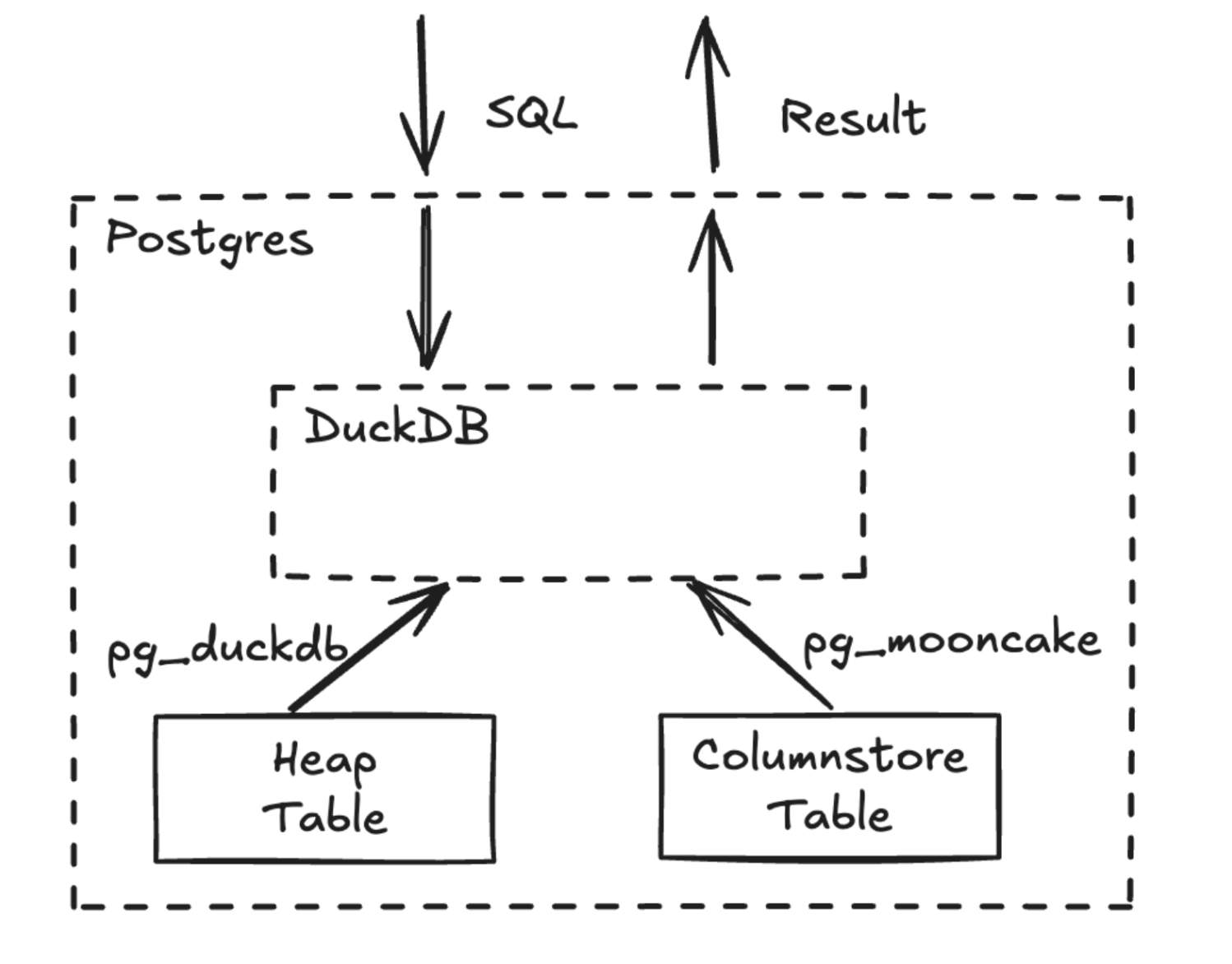
pg_mooncake v0.1 caches Parquet metadata and column statistics inside PostgreSQL (mooncake.data_files) and uses them for segment elimination during table scans.
Write Path
In v0.1, transactional INSERT, UPDATE, and DELETE statements run directly on USING columnstore tables. To support DELETE and UPDATE, an implicit row_id column consisting of (file_id, row_offset) identifies rows during table scans.
Each write transaction creates a new Parquet file. Because of this, pg_mooncake v0.1 is designed for batched writes (100,000–1,000,000 rows) rather than small, frequent OLTP transactions.
Local Disk Caching
On writes, data is cached on local disk (mooncake.enable_local_cache = true) to accelerate queries on recently written data before or alongside cloud object storage uploads.
5.2 - v0.1 Get Started
Historical v0.1 installation guide using Docker or source builds for PostgreSQL 14–17.
Legacy
pg_mooncake v0.1 Archive (Delta Lake Engine)This page documents pg_mooncake v0.1, which used direct CREATE TABLE ... USING columnstore DDL and Delta Lake storage. Starting in v0.2 and PGSTY’s v0.3.0 release, pg_mooncake uses moonlink real-time columnstore mirrors (CALL mooncake.create_table + USING mooncake) and Apache Iceberg v2. For current documentation, see Introduction and v0.1 vs v0.2 & v0.3.
Historical Docker Image (Obsolete)
Building v0.1 from Source
Create the Extension
5.3 - v0.1 Hello World (USING columnstore)
Basic operations on v0.1 USING columnstore tables: CREATE TABLE, INSERT, UPDATE, DELETE, transactions, and joins.
Legacy
pg_mooncake v0.1 Archive (Delta Lake Engine)This page documents pg_mooncake v0.1, which used direct CREATE TABLE ... USING columnstore DDL and Delta Lake storage. Starting in v0.2 and PGSTY’s v0.3.0 release, pg_mooncake uses moonlink real-time columnstore mirrors (CALL mooncake.create_table + USING mooncake) and Apache Iceberg v2. For current documentation, see Introduction and v0.1 vs v0.2 & v0.3.
Create the Extension
Create a USING columnstore Table (v0.1)
Inserts, Updates, and Deletes
Transactions
Joins
5.4 - v0.1 Cloud Storage (mooncake.create_secret)
Configuring S3 and Cloudflare R2 buckets in pg_mooncake v0.1 using mooncake.create_secret and mooncake.default_bucket.
Legacy
pg_mooncake v0.1 Archive (Delta Lake Engine)This page documents pg_mooncake v0.1, which used direct CREATE TABLE ... USING columnstore DDL and Delta Lake storage. Starting in v0.2 and PGSTY’s v0.3.0 release, pg_mooncake uses moonlink real-time columnstore mirrors (CALL mooncake.create_table + USING mooncake) and Apache Iceberg v2. For current documentation, see Introduction and v0.1 vs v0.2 & v0.3.
Current
v0.3.0 Cloud Storage SetupIn v0.2 and v0.3.0, credentials are inserted into duckdb.secrets rather than mooncake.create_secret. See Iceberg & Object Storage.
S3 Buckets (v0.1)
For S3 Express buckets:
Cloudflare R2 Buckets (v0.1)
Set Default Bucket
S3 and R2 Parameters
| Parameter | Description | Required |
|---|---|---|
name |
Name for your credentials | Yes |
key_id |
S3 / R2 access key ID | Yes |
secret |
S3 / R2 secret access key | Yes |
REGION |
AWS region where your bucket is located | Yes |
ENDPOINT |
Custom endpoint for R2 or S3 Express | Yes (R2 / S3 Express) |
SCOPE |
Bucket prefix path to scope credentials (e.g. s3://mybucket) |
No |
5.5 - v0.1 on Neon Postgres
Historical guide for enabling pg_mooncake v0.1 on Neon serverless PostgreSQL.
Legacy
pg_mooncake v0.1 Archive (Delta Lake Engine)This page documents pg_mooncake v0.1, which used direct CREATE TABLE ... USING columnstore DDL and Delta Lake storage. Starting in v0.2 and PGSTY’s v0.3.0 release, pg_mooncake uses moonlink real-time columnstore mirrors (CALL mooncake.create_table + USING mooncake) and Apache Iceberg v2. For current documentation, see Introduction and v0.1 vs v0.2 & v0.3.
pg_mooncake v0.1 was offered as an experimental extension on Neon.
Enable the Extension on Neon (v0.1)
Cloud Storage Requirement
Because Neon does not allow extensions to persist columnstore files on local compute disk, using pg_mooncake v0.1 on Neon required configuring an external S3 or Cloudflare R2 bucket as described in v0.1 Cloud Storage, and disabling Neon’s scale-to-zero feature to preserve local metadata caches.
5.6 - v0.1 Reference Overview
Reference index for pg_mooncake v0.1 DDL, Delta Lake metadata catalogs, GUC parameters, data loading, and external file queries.
Legacy
pg_mooncake v0.1 Archive (Delta Lake Engine)This page documents pg_mooncake v0.1, which used direct CREATE TABLE ... USING columnstore DDL and Delta Lake storage. Starting in v0.2 and PGSTY’s v0.3.0 release, pg_mooncake uses moonlink real-time columnstore mirrors (CALL mooncake.create_table + USING mooncake) and Apache Iceberg v2. For current documentation, see Introduction and v0.1 vs v0.2 & v0.3.
- v0.1 Columnstore DDL (
USING columnstore) - v0.1 Querying Columnstore Outside Postgres (
mooncake.columnstore_tables) - v0.1 GUC Configurations (
mooncake.maximum_memory,mooncake.maximum_threads) - v0.1 Load Data (
COPY&mooncake.read_parquet) - v0.1 Query External Files (
mooncake.read_parquet,mooncake.read_csv,iceberg_scan,delta_scan) - v0.1 Supported Queries & Query Shapes
5.7 - v0.1 Columnstore DDL (USING columnstore)
Creating and dropping USING columnstore tables in pg_mooncake v0.1, supported data types, constraints, and default_table_access_method.
Legacy
pg_mooncake v0.1 Archive (Delta Lake Engine)This page documents pg_mooncake v0.1, which used direct CREATE TABLE ... USING columnstore DDL and Delta Lake storage. Starting in v0.2 and PGSTY’s v0.3.0 release, pg_mooncake uses moonlink real-time columnstore mirrors (CALL mooncake.create_table + USING mooncake) and Apache Iceberg v2. For current documentation, see Introduction and v0.1 vs v0.2 & v0.3.
Create Columnstore Table (v0.1)
In v0.1, columnstore tables were created directly with the USING columnstore clause:
Drop Columnstore Table
Supported Features & Limitations in v0.1
- Supported:
INSERT,UPDATE,DELETE, ACID transactions,NOT NULLconstraints, default values, and joins with heap tables. - Unsupported Data Types in
v0.1:ENUM,uhugeint,JSONB(partial), and complex arrays. - Unsupported Constraints in
v0.1: Primary keys, foreign keys, unique constraints, indexes, and partitioned tables (ALTER TABLEschema changes required recreating the table).
Setting columnstore as Default Table Access Method (v0.1)
5.8 - v0.1 Querying Columnstore Outside Postgres
Inspecting mooncake.columnstore_tables and mooncake.data_files in pg_mooncake v0.1 and querying Delta Lake tables from Python Polars.
Legacy
pg_mooncake v0.1 Archive (Delta Lake Engine)This page documents pg_mooncake v0.1, which used direct CREATE TABLE ... USING columnstore DDL and Delta Lake storage. Starting in v0.2 and PGSTY’s v0.3.0 release, pg_mooncake uses moonlink real-time columnstore mirrors (CALL mooncake.create_table + USING mooncake) and Apache Iceberg v2. For current documentation, see Introduction and v0.1 vs v0.2 & v0.3.
Current
v0.3.0 Metadata FunctionIn v0.2 and v0.3.0, use SELECT * FROM mooncake.list_tables(); to inspect table LSNs and Apache Iceberg v2 warehouse locations.
Finding Table Locations (v0.1)
In v0.1, mooncake.columnstore_tables listed the Delta Lake directory path for each USING columnstore table:
Example output:
Viewing Data Files (v0.1)
Accessing v0.1 Delta Lake Tables with Polars
5.9 - v0.1 GUC Configurations
Historical PostgreSQL GUC variables in pg_mooncake v0.1 (mooncake.default_bucket, maximum_memory, maximum_threads, enable_local_cache, enable_memory_metadata_cache).
Legacy
pg_mooncake v0.1 Archive (Delta Lake Engine)This page documents pg_mooncake v0.1, which used direct CREATE TABLE ... USING columnstore DDL and Delta Lake storage. Starting in v0.2 and PGSTY’s v0.3.0 release, pg_mooncake uses moonlink real-time columnstore mirrors (CALL mooncake.create_table + USING mooncake) and Apache Iceberg v2. For current documentation, see Introduction and v0.1 vs v0.2 & v0.3.
v0.1 GUC Parameters
5.10 - v0.1 Load Data
Loading data into pg_mooncake v0.1 USING columnstore tables from Postgres tables, Parquet/CSV/JSON files, Iceberg/Delta tables, and HuggingFace.
Legacy
pg_mooncake v0.1 Archive (Delta Lake Engine)This page documents pg_mooncake v0.1, which used direct CREATE TABLE ... USING columnstore DDL and Delta Lake storage. Starting in v0.2 and PGSTY’s v0.3.0 release, pg_mooncake uses moonlink real-time columnstore mirrors (CALL mooncake.create_table + USING mooncake) and Apache Iceberg v2. For current documentation, see Introduction and v0.1 vs v0.2 & v0.3.
From PostgreSQL Heap Tables (v0.1)
From Parquet, CSV, or JSON Files (v0.1)
From Iceberg, Delta Lake, or HuggingFace (v0.1)
5.11 - v0.1 Query External Files
Querying external Parquet, CSV, JSON, Iceberg, and Delta Lake files in pg_mooncake v0.1 using mooncake.read_parquet, mooncake.read_csv, and mooncake.read_json.
Legacy
pg_mooncake v0.1 Archive (Delta Lake Engine)This page documents pg_mooncake v0.1, which used direct CREATE TABLE ... USING columnstore DDL and Delta Lake storage. Starting in v0.2 and PGSTY’s v0.3.0 release, pg_mooncake uses moonlink real-time columnstore mirrors (CALL mooncake.create_table + USING mooncake) and Apache Iceberg v2. For current documentation, see Introduction and v0.1 vs v0.2 & v0.3.
Current
v0.3.0 External File ReadersIn v0.2 and v0.3.0, use duckdb.read_parquet, duckdb.read_csv, duckdb.iceberg_scan, and duckdb.delta_scan as documented in Query Your Data Lake in Postgres.
Querying Parquet, CSV, and JSON (v0.1)
Querying Iceberg and Delta Lake (v0.1)
5.12 - v0.1 Supported Queries & Query Shapes
Analytical query patterns, unsupported PostgreSQL functions, and DuckDB function placeholders in pg_mooncake v0.1.
Legacy
pg_mooncake v0.1 Archive (Delta Lake Engine)This page documents pg_mooncake v0.1, which used direct CREATE TABLE ... USING columnstore DDL and Delta Lake storage. Starting in v0.2 and PGSTY’s v0.3.0 release, pg_mooncake uses moonlink real-time columnstore mirrors (CALL mooncake.create_table + USING mooncake) and Apache Iceberg v2. For current documentation, see Introduction and v0.1 vs v0.2 & v0.3.
For the updated v0.3.0 guide on query shapes and DuckDB 2.0 execution, see Query Columnstore & Query Shapes.
Analytical Aggregations & Time-Series (v0.1)
Exposing DuckDB Functions in Postgres (v0.1)
5.13 - v0.1 Data Archiving
Historical v0.1 pattern for moving old rows from heap tables into a USING columnstore archive table.
Legacy
pg_mooncake v0.1 Archive (Delta Lake Engine)This page documents pg_mooncake v0.1, which used direct CREATE TABLE ... USING columnstore DDL and Delta Lake storage. Starting in v0.2 and PGSTY’s v0.3.0 release, pg_mooncake uses moonlink real-time columnstore mirrors (CALL mooncake.create_table + USING mooncake) and Apache Iceberg v2. For current documentation, see Introduction and v0.1 vs v0.2 & v0.3.
Current
v0.3.0 Partition Archiving PatternIn v0.2 and v0.3.0, you no longer need manual INSERT INTO ... DELETE FROM batch scripts—simply mirror a partitioned table with CALL mooncake.create_table and DROP old partitions. See Archiving Large Postgres Tables.
How Archiving Worked in v0.1
5.14 - v0.1 Operational Analytics (Trigger + pg_cron Staging)
Historical v0.1 staging-table trigger and pg_cron pattern for near-real-time analytics before Moonlink was introduced.
Legacy
pg_mooncake v0.1 Archive (Delta Lake Engine)This page documents pg_mooncake v0.1, which used direct CREATE TABLE ... USING columnstore DDL and Delta Lake storage. Starting in v0.2 and PGSTY’s v0.3.0 release, pg_mooncake uses moonlink real-time columnstore mirrors (CALL mooncake.create_table + USING mooncake) and Apache Iceberg v2. For current documentation, see Introduction and v0.1 vs v0.2 & v0.3.
Replaced by
mooncake.create_table in v0.2 / v0.3.0In v0.1, syncing a rowstore table to a USING columnstore table required triggers, a staging table, and a pg_cron job. In v0.2 and v0.3.0, all of this is replaced by a single CALL mooncake.create_table('orders_analytics', 'orders');. See Real-Time Operational Analytics.
Historical v0.1 Staging & Trigger Pattern
5.15 - v0.1 Data Warehousing & dbt
Historical v0.1 guide for daily aggregation pipelines and dbt integration using default_table_access_method = ‘columnstore’.
Legacy
pg_mooncake v0.1 Archive (Delta Lake Engine)This page documents pg_mooncake v0.1, which used direct CREATE TABLE ... USING columnstore DDL and Delta Lake storage. Starting in v0.2 and PGSTY’s v0.3.0 release, pg_mooncake uses moonlink real-time columnstore mirrors (CALL mooncake.create_table + USING mooncake) and Apache Iceberg v2. For current documentation, see Introduction and v0.1 vs v0.2 & v0.3.
Daily Aggregation Pipeline (v0.1)
Integration with dbt (v0.1)
In v0.1, dbt models could target USING columnstore by setting default_table_access_method in an on-run-start hook:
6 - About
Project stewardship, historical roadmap, licensing, upstream attribution, trademark policy, and SBOM for the PGSTY Mooncake ecosystem.
mooncake.pgsty.com is the companion documentation and engineering site for the PGSTY forks of the Mooncake real-time analytics ecosystem for PostgreSQL and DuckDB:
| Repository | Current Tag | License | Upstream Origin | Description |
|---|---|---|---|---|
pgsty/pg_mooncake |
v0.3.0 |
MIT |
Mooncake-Labs/pg_mooncake |
Columnstore table extension for PostgreSQL (pgrx 0.19.3, pg_duckdb 1.2.0). |
pgsty/duckdb_mooncake |
v0.0.2 |
MIT |
Mooncake-Labs/duckdb_mooncake |
DuckDB 2.0.0 storage extension attaching to Moonlink real-time Iceberg tables. |
pgsty/moonlink |
v0.0.1 |
BSL-1.1 + Exception (MIT client crates) |
Mooncake-Labs/moonlink |
Rust engine ingesting real-time streaming updates and CDC into Apache Iceberg and Parquet. |
Sections
Historical upstream v0.2 feature roadmap and current PGSTY maintenance focus (v0.3.0+).
MIT, BSL-1.1 with the PG_MOONCAKE LINKING & DISTRIBUTION EXCEPTION, and CC-BY-4.0 documentation terms.
Mooncake Labs origins, Wayback Machine documentation recovery provenance, and repository lineage.
Trademark acknowledgments and independence statement for the PGSTY distribution.
Submodule pin matrix (versions.json) and the 2026-11-05 Cargo RustSec dependency security audit.
6.1 - Roadmap
Historical v0.2 feature roadmap from Mooncake Labs and current PGSTY maintenance focus.
Note
The roadmap items below reflect the historical upstream pg_mooncake v0.2 design goals published at docs.mooncake.dev/pg/roadmap, together with the current maintenance scope of the pgsty/pg_mooncake fork (v0.3.0).
PGSTY Maintenance Focus (v0.3.0+)
The PGSTY fork of the Mooncake suite (pg_mooncake v0.3.0, duckdb_mooncake v0.0.2, moonlink v0.0.1) prioritizes long-term production stability, PostgreSQL version coverage, and security hardening:
- PostgreSQL 14–18 Compatibility: Keeping
pg_mooncakesynchronized with currentpgrx(0.19.3) across PostgreSQL 14, 15, 16, 17, and 18 on Linux (x86_64andaarch64, RHEL/Rocky EL8–EL10, Debian 12/13, Ubuntu 22.04/24.04). - DuckDB
2.0.0&pg_duckdb 1.2.0Alignment: Maintaining ABI compatibility betweenpg_mooncake,pg_duckdb, andduckdb_mooncakeas DuckDB evolves itsTableCatalogEntry,TableFilterSet, andStorageExtensionAPIs. - Correctness & Fail-Fast Guards: Enforcing runtime
pg_duckdbversion checks, LSN-consistent snapshot reads on columnstore tables, automaticREPLICA IDENTITY FULLpropagation across partitioned table hierarchies, and explicit0A000errors on deprecated helpers. - Dependency Security Hygiene: Regularly auditing and upgrading Rust dependencies across all three lockfiles (
pg_mooncake,moonlink,duckdb_mooncake/moonlink_ffi) against the RustSec Advisory Database.
Historical Upstream Roadmap (v0.2)
The following four capabilities were outlined by Mooncake Labs for the v0.2 architecture:
1. Columnstore Table for Logs / Events
Introduce an append-only mode for columnstore tables:
- Optimized for streaming ingestion and out-of-order inserts.
- Built-in time-based partitioning and retention policies.
- Targeted at observability, telemetry, and high-throughput event pipelines.
2. Native Columnstore Tables (Without a Backing Rowstore)
Create and write directly to a columnstore table without requiring a companion PostgreSQL heap table:
- Supports standard
INSERT,SELECT,UPDATE,DELETE, andCOPYdirectly against the columnstore access method. - Note: Native
USING columnstoretables were available inv0.1(Delta Lake), whereasv0.2andv0.3.0usemooncake.create_table(dst, src)to mirror a PostgreSQL heap table via logical replication.
3. Write to Existing Iceberg Tables
Create a columnstore mirror in PostgreSQL that writes into an existing external Apache Iceberg table managed by a REST or JDBC catalog, allowing bilateral interoperability with Spark, Trino, and Flink writers.
4. Query Routing & Partitioned Tables
Transparently route analytical queries across hybrid rowstore + columnstore partitioned hierarchies without requiring manual UNION ALL queries or explicit dual-table references.
6.2 - License
Open-source and source-available licenses across pg_mooncake, duckdb_mooncake, moonlink, and mooncake.pgsty.com.
The PGSTY Mooncake ecosystem preserves the exact upstream license terms of each repository created by Mooncake Labs, Inc.
Summary by Repository
| Component | Repository | License | Notes |
|---|---|---|---|
pg_mooncake |
pgsty/pg_mooncake |
MIT |
Permissive open-source license (Copyright (c) 2024 Mooncake Labs). |
duckdb_mooncake |
pgsty/duckdb_mooncake |
MIT |
Permissive open-source license (Copyright (c) 2025 Mooncake Labs). |
moonlink (Engine) |
pgsty/moonlink |
BSL-1.1 + Exception |
Business Source License 1.1 with the PG_MOONCAKE LINKING & DISTRIBUTION EXCEPTION, converting to Apache-2.0 on 2029-05-05. |
moonlink (Client Crates) |
moonlink_rpc, moonlink_proto, moonlink_error, moonlink_table_metadata |
MIT |
Explicitly licensed under MIT so pg_mooncake and duckdb_mooncake remain pure MIT works when linking against them. |
| Documentation Site | pgsty/mooncake.pgsty.com |
CC-BY-4.0 / Apache-2.0 |
Documentation prose under Creative Commons Attribution 4.0 International (CC-BY-4.0); site build scripts under Apache-2.0. |
pg_mooncake & duckdb_mooncake — MIT License
Both pg_mooncake and duckdb_mooncake are distributed under the MIT License:
moonlink — Business Source License 1.1 + pg_mooncake Exception
moonlink is licensed under the Business Source License 1.1 (BSL-1.1) together with the PG_MOONCAKE LINKING & DISTRIBUTION EXCEPTION:
- Licensor: Mooncake Labs, Inc.
- Licensed Work:
moonlink(v0.0.1) - Change Date:
2029-05-05 - Change License:
Apache-2.0(Apache License, Version 2.0)
Additional Use Grant
You may make use of the Licensed Work provided that such use does not constitute Offering the Licensed Work as a Managed Service. “Offering the Licensed Work as a Managed Service” means providing third parties with access to functionality of the Licensed Work as part of a cloud service, software-as-a-service (SaaS), platform-as-a-service (PaaS), database-as-a-service (DBaaS), or similar hosted service where the primary value of the service derives substantially from the functionality of the Licensed Work itself, and competes with a commercial product or service offered by the Licensor.
Notwithstanding the foregoing, you may use the Licensed Work internally within your organization, including in production environments, and you may incorporate the Licensed Work into software applications or services provided to third parties so long as such services do not expose the Licensed Work itself (or a substantially similar data ingestion/columnstore management interface) as a managed service.
PG_MOONCAKE LINKING & DISTRIBUTION EXCEPTION
Because pg_mooncake embeds moonlink via FFI (pg_mooncake_moonlink_ffi) and duckdb_mooncake links moonlink_ffi, the upstream license includes an explicit linking and distribution exception:
1. MIT Client Crates. The client interface crates contained in this repository — specifically
moonlink_rpc,moonlink_proto,moonlink_error, andmoonlink_table_metadata— are separately licensed under the MIT License (see theLICENSE-MITfile in each crate directory) and are not part of the BSL-covered Licensed Work.2. Linking Permission. You may compile, link (statically or dynamically), and combine the Licensed Work (
moonlink, includingpg_mooncake_moonlink_ffi) withpg_mooncake(and any MIT-licensed fork or derivative ofpg_mooncake) to produce a combined binary or PostgreSQL extension package (a “Combined Extension”), without such linking causing thepg_mooncakesource code itself to become subject to the Business Source License 1.1. Thepg_mooncakesource code remains governed by its own MIT License.3. Binary Redistribution Permission. You may build, package, and redistribute a Combined Extension in source or binary form (including via Linux distribution repositories, container images, PGXN, Pigsty, Homebrew, or similar package managers) to third parties free of charge, provided that: (a) the Combined Extension includes or is accompanied by a copy of this
LICENSEfile; and (b) any recipient’s use of themoonlinkportion of the Combined Extension remains subject to the terms and conditions of the Business Source License 1.1 above (in particular, the restriction against Offering the Licensed Work as a Managed Service).4. Scope. This exception applies solely to linking and redistribution with
pg_mooncake(and its MIT-licensed forks/derivatives) andduckdb_mooncake. It does not grant permission to offer the Combined Extension, ormoonlinkstandalone, as a Managed Service in violation of the Additional Use Grant above.
Third-Party Bundled Submodules
The pg_mooncake repository also builds against two MIT/Apache-licensed submodules pinned in versions.json:
pg_duckdb(v1.2.0):MITLicense (Copyright (c) 2024 Hydra, MotherDuck, and pg_duckdb contributors).rust-postgres(14c8e599): Dual-licensed underApache-2.0 OR MIT.
6.3 - Attribution
Upstream credits to Mooncake Labs, Wayback Machine documentation recovery provenance, and repository lineage.
Upstream Creators
pg_mooncake, duckdb_mooncake, and moonlink were created by Mooncake Labs. All core architectural credit — including the hybrid rowstore + columnstore design, the Moonlink real-time Iceberg buffer engine, logical replication WAL ingestion, and the DuckDB execution bridge — belongs to the original Mooncake Labs authors and contributors.
Repository Lineage
| PGSTY Repository | Upstream Source | Upstream Baseline Commit | PGSTY Release Tag |
|---|---|---|---|
pgsty/pg_mooncake |
Mooncake-Labs/pg_mooncake |
v0.2.0 (be17cd0) + post-0.2 upstream commits |
v0.3.0 (1a9cbfd65be9a6486d020120acb49ef0c6800d68) |
pgsty/duckdb_mooncake |
Mooncake-Labs/duckdb_mooncake |
ba79184 |
v0.0.2 (49765a369ad88986916ce53c969ed2ce4ba66fac) |
pgsty/moonlink |
Mooncake-Labs/moonlink |
f2e1715 |
v0.0.1 (b298ef7444890e3c8af5544e350232518bcfd8e5) |
pgsty/pg_duckdb |
duckdb/pg_duckdb |
v1.2.0 |
v1.2.0 (8756099e267c47f0b86c24de4cf995327f1f4279) |
Documentation Provenance & Recovery
The original upstream documentation website (https://docs.mooncake.dev/) was taken offline after the upstream project transitioned direction, and no public documentation source repository remained available on GitHub.
To preserve the reference manuals for both v0.2 (Moonlink + Iceberg) and v0.1 (Delta Lake):
- Wayback Machine Snapshot Extraction: All 34 canonical documentation pages (17
v0.2pages, 16v0.1pages, and 1 Moonlink overview page) plus 30 historical alias routes and 4 original architecture diagrams were recovered from the Internet Archive Wayback Machine snapshot (2025-12-07). - Verification Against
v0.3.0Source: Every SQL function signature, configuration GUC, environment variable, and error code was cross-checked against thepgsty/pg_mooncake v0.3.0source tree (pgrx 0.19.3,pg_duckdb 1.2.0,duckdb_mooncake v0.0.2,moonlink v0.0.1). - Bilingual Translation & Engineering Reports: PGSTY added full Simplified Chinese translations (
/zh/docs/) and published engineering reports covering the DuckDB 2.0 adaptation,pgrx 0.19.3migration, and the 2026-11-05 RustSec dependency audit.
Every page adapted from the historical upstream documentation includes upstream_source and upstream_link metadata in its front matter.
6.4 - Trademark Policy
Trademark acknowledgments and independence statement for the PGSTY Mooncake distribution.
Independence Statement
mooncake.pgsty.com and the repositories under github.com/pgsty (pgsty/pg_mooncake, pgsty/duckdb_mooncake, pgsty/moonlink) are maintained independently by PGSTY (Pigsty) for the PostgreSQL open-source community.
This site and the packages distributed by Pigsty / PGEXT are not affiliated with, endorsed by, or sponsored by Mooncake Labs, Inc.
Third-Party Trademarks
- Mooncake, pg_mooncake, duckdb_mooncake, and Moonlink are names originated by Mooncake Labs, Inc. They are used on this website solely for nominative, descriptive identification of the open-source PostgreSQL and DuckDB extensions and their compatibility lineage.
- PostgreSQL and Postgres are registered trademarks of the PostgreSQL Community Association of Canada.
- DuckDB is a trademark of the DuckDB Foundation / DuckDB Labs.
- Apache Iceberg, Apache Parquet, Apache Arrow, and Apache are trademarks of the Apache Software Foundation.
- Delta Lake is a trademark of LF Projects, LLC.
- Pigsty and PGSTY are trademarks of Ruohang Feng (
@Vonng).
6.5 - SBOM & Security Audit
Software Bill of Materials (versions.json), submodule pin matrix, and the 2026-11-05 Cargo RustSec dependency audit for pg_mooncake 0.3.0.
This page documents the exact submodule pin matrix (versions.json) and the dependency security audit performed for pg_mooncake v0.3.0, duckdb_mooncake v0.0.2, and moonlink v0.0.1.
Component & Submodule Pin Matrix (versions.json)
pgsty/pg_mooncake records its exact submodule and upstream dependency pins in versions.json:
| Component | Path | Repository | Tag / Branch | Commit SHA | License |
|---|---|---|---|---|---|
pg_mooncake |
/ |
pgsty/pg_mooncake |
v0.3.0 |
1a9cbfd65be9a6486d020120acb49ef0c6800d68 |
MIT |
duckdb_mooncake |
duckdb_mooncake |
pgsty/duckdb_mooncake |
v0.0.2 |
49765a369ad88986916ce53c969ed2ce4ba66fac |
MIT |
duckdb (nested) |
duckdb_mooncake/duckdb |
duckdb/duckdb |
v2.0.0 |
d54cbbe3df17e8e5ce68312f483b4155836112aa |
MIT |
moonlink |
moonlink (duckdb_mooncake/moonlink) |
pgsty/moonlink |
v0.0.1 |
b298ef7444890e3c8af5544e350232518bcfd8e5 |
BSL-1.1 + Exception (MIT client crates) |
pg_duckdb |
pg_duckdb |
pgsty/pg_duckdb |
v1.2.0 |
8756099e267c47f0b86c24de4cf995327f1f4279 |
MIT |
rust-postgres |
rust-postgres |
sfackler/rust-postgres |
master |
14c8e599f5551a8caa96ff5023685a6f537a1455 |
Apache-2.0 OR MIT |
Core Rust Toolchain & Framework Pins
| Dependency | Version | Role |
|---|---|---|
pgrx / cargo-pgrx |
0.19.3 |
PostgreSQL extension framework for Rust (PostgreSQL 14–18). |
iceberg |
0.6.0 |
Apache Iceberg table metadata and catalog client in moonlink. |
arrow / parquet |
55.2.0 |
Columnar memory format and Parquet writer in moonlink. |
datafusion |
48.0.1 |
Expression evaluation and pruning in moonlink. |
opendal |
0.53.1 |
Unified object storage abstraction (fs, s3, gcs, azblob). |
tonic / prost |
0.14.5 / 0.14.3 |
gRPC / IPC protocol serialization between pg_mooncake and moonlink. |
tokio |
1.53.0 |
Async runtime for background ingestion and object store I/O. |
2026-11-05 Cargo Dependency Security Audit
All three Cargo workspaces were audited using cargo-audit 0.22.2 against the RustSec Advisory Database (commit 965bf9ad083b58e6340d65829d85217b18be9290, 927 advisories loaded).
Before vs. After Remediation Summary
| Lockfile | Before Audit | After Remediation | Reduction |
|---|---|---|---|
pg_mooncake/Cargo.lock |
33 vulnerabilities, 1 unsound, 19 warnings | 6 vulnerabilities, 0 unsound, 15 warnings | -27 vulnerabilities (-82%), -100% unsound |
moonlink/Cargo.lock |
46 vulnerabilities, 1 unsound, 28 warnings | 15 vulnerabilities, 0 unsound, 24 warnings | -31 vulnerabilities (-67%), -100% unsound |
duckdb_mooncake/moonlink_ffi/Cargo.lock |
1 vulnerability, 0 unsound, 0 warnings | 0 vulnerabilities, 0 unsound, 0 warnings | -100% (Clean) |
Resolved Vulnerabilities
- Direct / Major Upgrades:
tonic 0.12 -> 0.14.5,prost 0.13 -> 0.14.3(resolvedRUSTSEC-2026-0001DoS viarkyvOOM andRUSTSEC-2024-0436pasteunmaintained induckdb_mooncake).bincode 1.3.3 -> 2.1.0(serdecompatibility path, resolvedRUSTSEC-2025-0141).opentelemetry 0.27 -> 0.31.0,opentelemetry-otlp 0.27 -> 0.31.1,tracing-opentelemetry 0.28 -> 0.32.1.reqwest 0.12.20 -> 0.12.28,tokio-tarreplaced viatestcontainers 0.23.3 -> 0.27.2(resolvedRUSTSEC-2025-0065PAX header parsing vulnerability).
- Transitive Security Upgrades:
bytes 1.10.1 -> 1.11.1(RUSTSEC-2026-0007: integer overflow inBytesMut::reserve).quinn-proto 0.11.12 -> 0.11.14(RUSTSEC-2026-0037: DoS in Quinn endpoints).rustls 0.23.28 -> 0.23.37andrustls-webpki 0.103.3 -> 0.103.12(RUSTSEC-2026-0049,RUSTSEC-2026-0098,RUSTSEC-2026-0099: CRL distribution point and wildcard name constraint validation fixes).aws-lc-rs 1.13.1 -> 1.16.3andaws-lc-sys 0.29.0 -> 0.39.1(7 PKCS7 / AES-CCM / X.509 timing and logic advisories).lz4_flex 0.11.4 -> 0.11.6(RUSTSEC-2026-0041: memory information leak).tar 0.4.44 -> 0.4.45(RUSTSEC-2026-0067&RUSTSEC-2026-0068: PAX size header and symlink chmod vulnerabilities).time 0.3.41 -> 0.3.47(RUSTSEC-2026-0009: RFC 2822 stack exhaustion DoS).wasmtime 29.0.1 -> 43.0.1(df-wasmpinned to43.0.1, eliminating 12 WASI/Wasmtime guest sandbox advisories and theregalloc2unsoundness warning).glib 0.20.12 -> 0.22.4(resolvedRUSTSEC-2026-0097VariantStrIterunsoundness).
Remaining Transitive Advisories (Upstream-Blocked by iceberg 0.6.0 / arrow 55)
The remaining 6 advisories in pg_mooncake/Cargo.lock are transitive dependencies pulled in by iceberg 0.6.0 (which pins arrow 55, parquet 55, avro-schema 0.3, and reqwest 0.12) and deltalake-core 0.26.0 in moonlink:
rsa 0.9.10(RUSTSEC-2023-0071, Marvin Attack): pulled in transitively viaiceberg-catalog-sql -> sqlx-mysql. Not used at runtime becausemoonlinkdisables default SQLx MySQL TLS features and only initializes PostgreSQL/REST Iceberg catalogs.md5 0.7.0(RUSTSEC-2025-0146, crate renamed tomd-5): pulled in byavro-schema 0.3.0.snappy 0.4.0(RUSTSEC-2026-0046, integer truncation on >4 GiB buffers): pulled in byavro-schema 0.3.0; Avro metadata manifests in Iceberg are kilobytes to megabytes in size.rustls-webpki 0.102.8(RUSTSEC-2026-0049,0098,0099): legacy0.102branch pulled in viareqwest 0.11iniceberg 0.6transitive tree; primary TLS connections use patchedrustls-webpki 0.103.12.